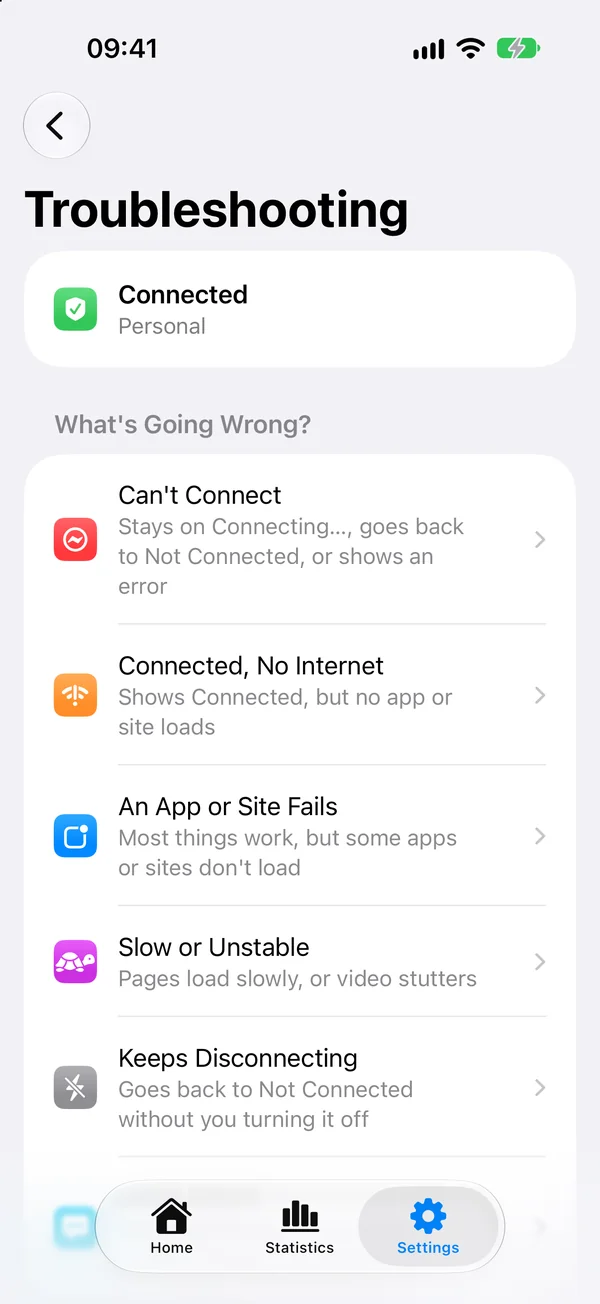
Each page in this section starts from what you see going wrong, lists the likely causes in the order Potatso checks them, and says what to try.
Can't connect
The status stays on Connecting…, goes back to Not Connected, or shows an error.
Connected, no internet
The status shows Connected, but no app or site loads.
An app or site fails
Most things work, but some apps or sites don't load.
Slow or unstable
Pages load slowly, or video stutters.
Keeps disconnecting
The status goes back to Not Connected without you turning it off.
Diagnostics and reports
Run a full check and send the report to support.
Troubleshooting in the app
Potatso has the same help built in. Open Settings in Potatso and tap Troubleshooting. When connecting fails, the error alert also has a Troubleshoot button that opens it.
The Troubleshooting page shows whether the VPN is connected and which configuration it uses. Under What's Going Wrong?, tap the problem you see:
- Can't Connect and Connected, No Internet run a guided check. It tests each step in turn, then shows what it found and the fixes for it.
- An App or Site Fails, Slow or Unstable and Keeps Disconnecting show advice for that problem.
- Other Issues opens an email to support with a diagnostic report attached.
The same page has two Quick Fixes:
- Update Subscriptions downloads your subscriptions again. It appears when your configuration comes from a subscription.
- Reset VPN Configuration removes Potatso's entry in iOS VPN settings. Use it when the VPN is stuck connecting or disconnecting. Your profiles are kept, the VPN disconnects, and iOS asks for permission again the next time you connect.
Run Diagnostics, at the bottom, checks your network, configuration, VPN, servers and DNS, and builds a report you can send to support. See Diagnostics and reports.