
What you see
Potatso shows Connected, and the VPN icon is in the iOS status bar, but no app or site loads.
If only some apps or sites fail, see An app or site doesn't load. If the status never reaches Connected, see The VPN won't connect.
Run the guided check
- In Potatso, open Settings and tap Troubleshooting.
- Under What's Going Wrong?, tap Connected, No Internet.
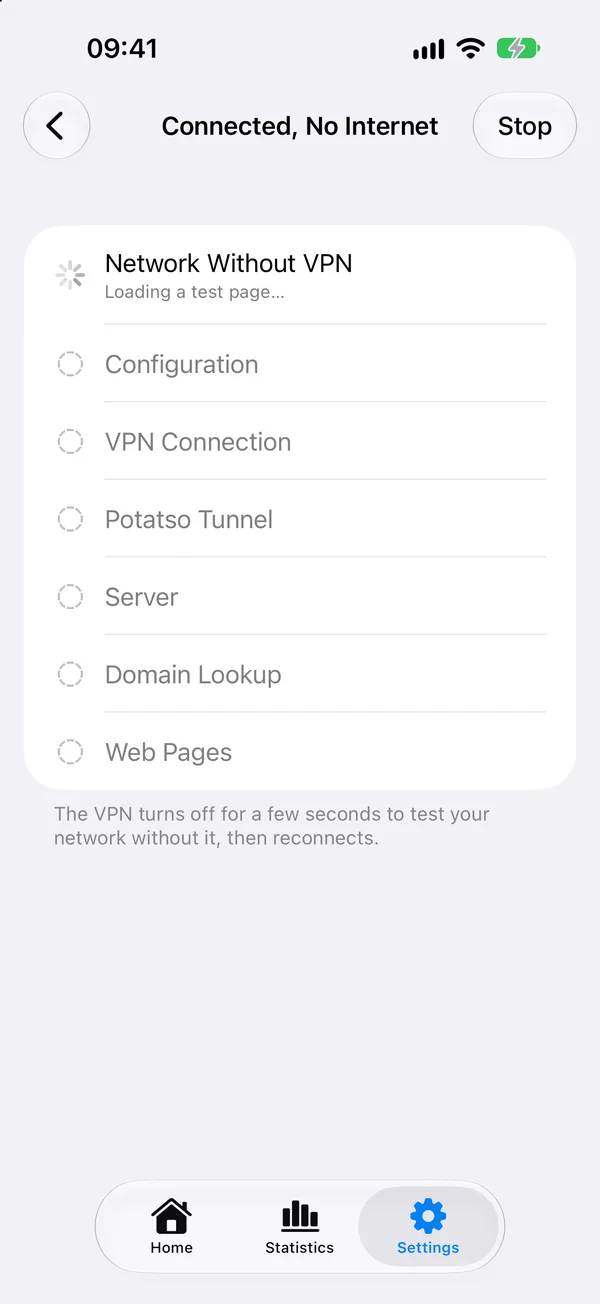
Potatso checks seven steps in order: Network Without VPN, Configuration, VPN Connection, Potatso Tunnel, Server, Domain Lookup and Web Pages. The VPN turns off for a few seconds to test your network without it, then reconnects.
When the check finishes, it shows what it found with buttons for the fixes, and What We Checked lists each step. Tap a step to see its details. Tap Run Again to check again after a fix.
Causes and fixes
Potatso rules out causes in this order. The first one that matches is the one it shows.
Your network, configuration or VPN
The check first rules out the causes it also checks when the VPN won't connect: no network without the VPN, no configuration or servers, no server chosen, missing VPN permission, a configuration error, and a broken VPN configuration.
Potatso isn't responding
The VPN is on, but Potatso's tunnel didn't answer. Tap Reconnect to restart it. If that doesn't help, tap Reset VPN Configuration.
The VPN is running an old configuration
The VPN isn't routing traffic the way your profile says, so it's still using an earlier configuration. Tap Reconnect to load the current one. If this keeps happening, tap Send Report.
Your server isn't responding
Your network works, but the server you use didn't answer. When another of your servers works, the check offers Switch to that server.
When no other server answers, the check says why this one failed:
| What the check says | What it means |
|---|---|
| The server didn't respond | The server never answered. It may be offline, or blocked on the network you're using. |
| The server refused the connection | The port may be wrong, or the service isn't running. |
| The server rejected your credentials | The server rejected the username or password. |
| Couldn't connect securely | The secure connection failed. Its TLS settings, such as the server name, may not match. |
| Couldn't look up the server's address | The server's domain name couldn't be looked up. Your network's DNS may be refusing these lookups; switching networks often helps. |
Then try this:
- Check the server's address, port, username and password.
- Ask your provider whether the service is active and whether your IP address needs to be allowlisted.
- Switch between Wi-Fi and mobile data.
- Choose another server, or add another one if your provider offers one.
If your configuration comes from a subscription, Update Subscriptions gets its current settings.
None of your servers respond
Your network works, but no server answered. Potatso checks your subscription for the reason:
- The subscription expired. Renew it with your provider, then update it in Potatso.
- The subscription's data allowance is used up. Top it up with your provider, then update it in Potatso.
- Otherwise the servers may be down, or your subscription may have changed. Tap Update Subscriptions, or contact your provider.
Domain lookups are failing
Your server works, but looking up website addresses through the VPN fails.
- If you changed this profile's DNS settings, tap Revert DNS Changes to go back to the subscription's. See DNS.
- Otherwise tap Reconnect. If that doesn't help, send a report.
Web pages don't load through the VPN
Your network, server and DNS all work, but test pages still don't load through the VPN. Tap Reconnect. If that doesn't help, send a report.
Everything looks fine
Your network, the VPN, your server and DNS all work. If one app or site still fails, see An app or site doesn't load.
Where the problem may be
When the cause isn't settled, the check also ranks where the problem may be, under Where the Problem May Be. Each area is marked Most Likely or Possible, with the clues that point there and what to try:
| Area | What to try |
|---|---|
| Your Network | Switch between Wi-Fi and mobile data, or try another network. If it works there, the network you're on is blocking the connection. |
| The Server or Provider | Try another server, update your subscription, or ask your provider whether the service is working. |
| The Configuration | Update your subscription to get the current settings, or compare the server's settings with what your provider gave you. |
| Potatso | This may be something Potatso gets wrong. Reconnect, and if it keeps happening, send a report so we can fix it. |
For example, when every server from one subscription fails but others work, the provider is the likely cause. When the server worked on Wi-Fi before and you're now on mobile data, the network is. See How Potatso ranks causes.
Contact support
After the check, Potatso asks Did This Fix It?. If it didn't, tap No, Send Report. Potatso opens an email to support with the check's results and a diagnostic report attached. For a full report, run diagnostics first.
For questions or support, email hi@potatso.com.