
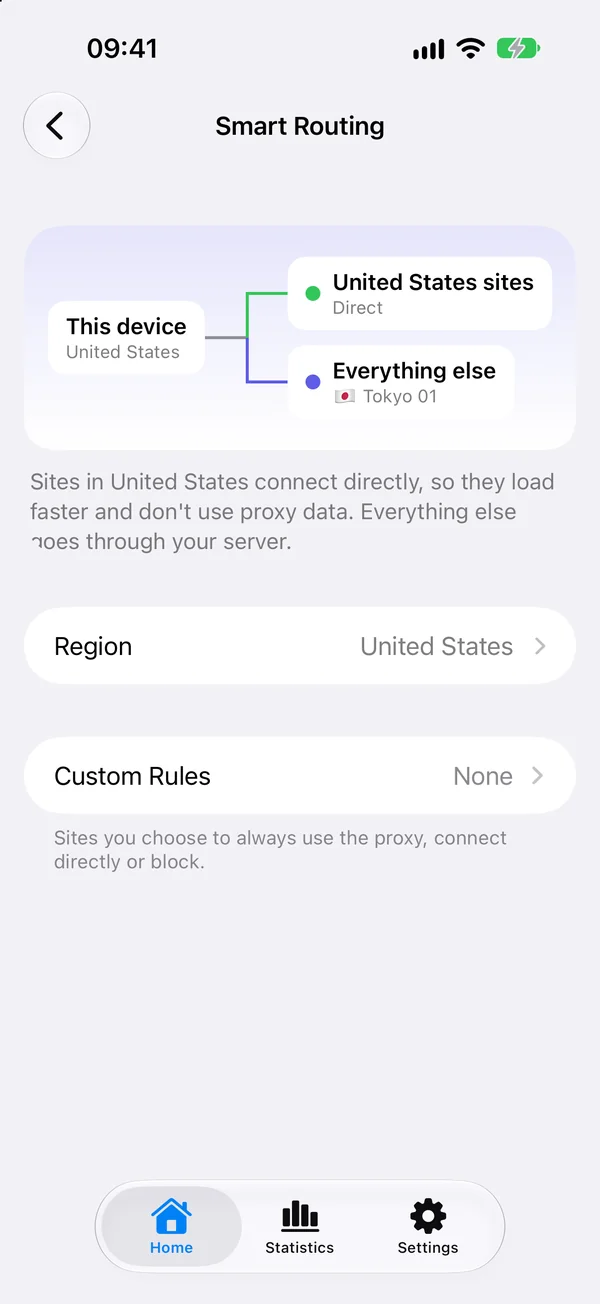
Smart Routing is Potatso's Smart outbound mode. Sites in your region connect directly, so they load faster and don't use your server's data. Everything else goes through your server. Smart keeps its lists up to date for you, so there are no rules to write.
Smart is one of four outbound modes, with Rule, Global and Direct. See Outbound modes to compare them.
Turn on Smart
- On Home, tap the outbound mode row.
- Choose Smart.
The first time you choose Smart, Potatso introduces it and asks you to confirm your region. Smart becomes the outbound mode of the current profile. Your servers and rules stay as they are, and you can switch back to Rule or Global on Home at any time.
Smart isn't available for a Personal VPN profile.
Choose your region
Smart sends sites in one region directly. By default, the region is Automatic: Potatso uses your device's time zone, or its Region setting. Connecting to a VPN doesn't change either.
To pin a region, for example when you use a roaming SIM:
- On Home, tap Smart Routing Settings.
- Tap Region.
- Choose a country or region. Tap Automatic to follow your device again.
The region applies to every profile.
Choose the server Smart uses
In Smart mode, the Main Outbound card on Home shows the server Smart sends traffic through. Tap a server to use it.
Smart always uses one of your servers. You can't choose a proxy group or Direct for it. When you first switch to Smart, it keeps the server your profile already uses, or else your first server.
What Smart ignores
Smart makes its own groups and rules from your profile's servers. In Smart mode, your profile's Proxy Groups, Rules and Rule Providers aren't used. More Configurations on Home marks them as not used. Switch to Rule mode to use them again.
Add custom rules
When a site doesn't load the way you want, add a custom rule for it:
- On Home, tap Smart Routing Settings.
- Tap Custom Rules, then Add Rule….
- Under When Connecting To, choose a rule type, such as Domain Suffix, and enter the site.
- Under Route To, choose Proxy, Direct or Block.
- Tap Add.
Custom rules apply before Smart's own rules, in every profile. They can use any rule type except Rule Set, because Smart doesn't use your profile's rule providers. Local network addresses always connect directly, before any custom rule.
To edit a custom rule, tap it. To remove it, swipe left and tap Remove.
Pro and free trials
You can choose Smart without Potatso Pro, but connecting with it needs Pro. Without Pro, Home shows a PRO badge next to Smart.
- When the App Store offers you a free trial of Potatso Pro, the Smart introduction offers it.
- Otherwise, the introduction offers 3 days of Smart for free, once. After that, Smart needs Pro again.
- A profile that used Smart Routing in Potatso 2 keeps Smart for free.
If you connect in Smart mode without Pro, Potatso asks you to Upgrade to Pro or Switch to Global.