
A proxy subscription is a private URL from your proxy provider that returns your list of servers. Your proxy app downloads it, imports every server at once, and downloads it again later so new or changed servers show up on their own. A Clash subscription link is the same idea, except the URL returns a full Clash configuration with proxy groups and rules as well as servers.
This guide explains what a subscription contains, the three common formats, how apps fetch and update them, and how to keep yours private.
What is a proxy subscription?
A single server can be shared as one share link, such as ss://… or vless://…. That works for one server you run yourself. Providers usually give you many servers in different locations, and they change addresses, ports and keys from time to time. Sending you new links each time wouldn’t scale.
So instead they give you one URL, for example:
https://sub.example.com/api/v1/client/subscribe?token=abc123Behind that URL is a document that lists your servers. The token part identifies your account, so the same URL returns your own servers and nobody else’s. You paste it into your app once, and the app keeps it in sync.
| Share link | Subscription URL | |
|---|---|---|
| Holds | One server | A list of servers, often groups and rules |
| Looks like | ss://, vless://, trojan://, … |
https://… |
| Changes | Never: a new server means a new link | The provider updates what it returns |
| Updates in your app | No | Yes, on a schedule or when you ask |
Common subscription formats
There’s no single standard. Three formats cover most providers.
Base64 subscriptions (V2Ray, Xray, Shadowsocks)
The oldest and simplest format is a plain list of share links, one per line, encoded in Base64. Decoded, it looks like this:
ss://YWVzLTI1Ni1nY206c2VjcmV0@ss.example.com:8388#Tokyo
vless://3971e1b2-18a3-4f83-8fa6-bf9b142ee258@vless.example.com:443?security=tls&sni=vless.example.com#Singapore
trojan://secret@trojan.example.com:443?sni=trojan.example.com#Frankfurt
It’s easy for any app to read, but it only lists servers. There are no groups and no rules, so your app decides how to route traffic.
Clash and Mihomo YAML
A Clash subscription returns a YAML configuration. Mihomo, the engine behind most current Clash apps, reads the same format with more protocols. A trimmed example:
proxies:
  - name: Tokyo
    type: ss
    server: ss.example.com
    port: 8388
    cipher: aes-256-gcm
    password: secret
proxy-groups:
  - name: Auto
    type: url-test
    proxies: [Tokyo]
    url: https://www.gstatic.com/generate_204
    interval: 300
rules:
  - DOMAIN-SUFFIX,example.org,DIRECT
  - MATCH,Auto
Besides proxies, a Clash configuration can include proxy-groups (manual, fastest or fallback choices), rules that decide what goes through the proxy, rule-providers and proxy-providers that pull more lists from other URLs, and dns settings. That’s why people prefer a Clash subscription when one is offered: you get a ready-made routing setup, not just servers.
Surge profiles
Surge uses an INI-style text file with sections such as [Proxy], [Proxy Group] and [Rule]. Many providers offer it too. Apps other than Surge can read the shared parts, but Surge-only sections, such as scripts and URL rewrites, have no equivalent elsewhere.
How apps fetch a subscription
When your app downloads a subscription, it sends a normal HTTPS request. Two details matter.
The user agent decides the format
Many provider panels send a different format depending on which app asks, and they tell apps apart by the User-Agent header. A request that says it’s a Clash client gets YAML, while others may get a Base64 list. Some panels also let you pick the format with an extra part in the URL; check your provider’s instructions.
Potatso identifies itself as clash.meta when it downloads a subscription. A panel that picks the format by app therefore sends its Clash / Mihomo configuration, with groups and rules, to Potatso too.
Headers carry your data allowance
Many panels add a subscription-userinfo header to the response:
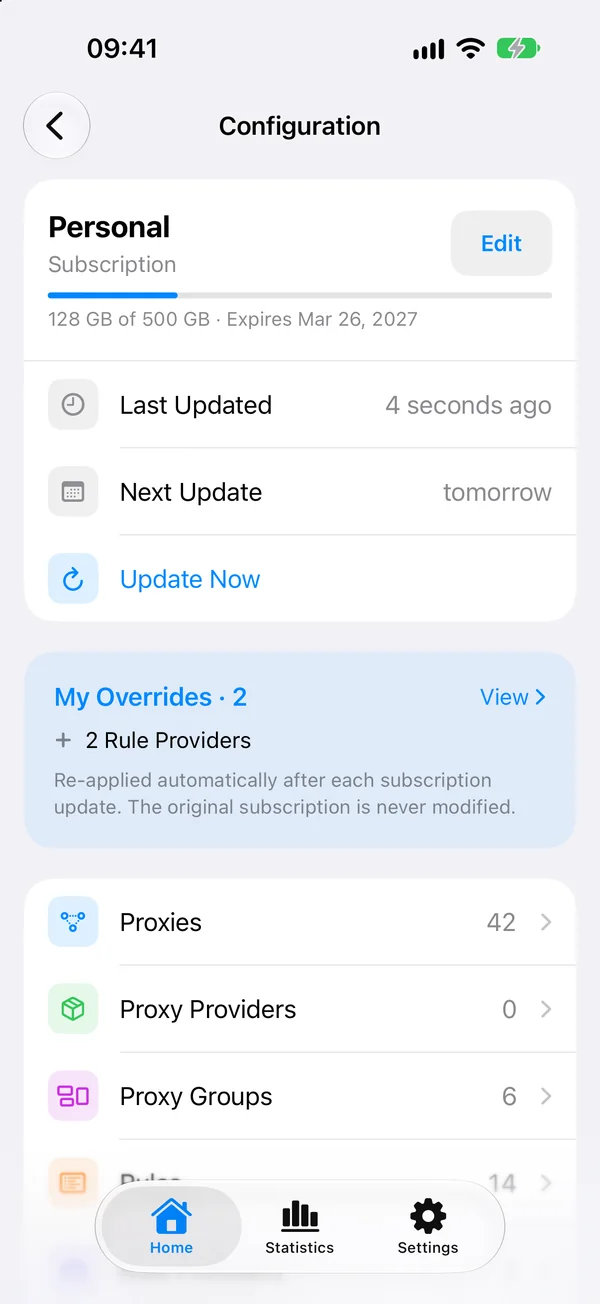
subscription-userinfo: upload=1234; download=5678; total=107374182400; expire=1798761600upload and download are the bytes you’ve used, total is your plan’s allowance, and expire is a Unix timestamp for when the plan ends. Apps that read it can show your data used and expiry date without logging in to the provider’s website. A Content-Disposition header with a file name often becomes the profile’s name.
Automatic updates
A subscription is only useful if it stays current. Apps download it again on a schedule, commonly once a day, and replace the old server list with the new one. Most apps also let you update by hand when a server stops working.
A good app also keeps your own changes. If you rename a group or add a rule, you don’t want the next update to undo it. Potatso, for example, records your edits as overrides and applies them again after every update, without touching the original subscription.
Keep your subscription URL private
A subscription URL is effectively a password:
- Anyone with it can use your account. They can import your servers and use up your data allowance.
- Don’t post it. That includes screenshots, QR codes, bug reports and group chats.
- Prefer HTTPS. A subscription fetched over plain
http://can be read and changed on the way. Potatso shows a notice when a configuration comes over plain HTTP. - Reset it if it leaks. Most provider dashboards have a button to reset the subscription link. Then import the new URL.
- Be careful with online converters. Pasting your URL into a third-party conversion website hands your servers to that website.
Subscriptions and protocols
A subscription is just a container. The servers inside it use protocols such as Shadowsocks, VLESS, Trojan, Hysteria 2 or AnyTLS, and your app must support each one to use it. An app usually skips servers it can’t use and tells you why. See Proxy protocols compared for how those protocols differ, and What is Shadowsocks? for the most common one.
Use a subscription on iPhone
Potatso, a free proxy client for iPhone and iPad, imports Clash / Mihomo YAML, Base64 subscriptions, V2Ray / Xray JSON, Surge profiles and Shadowsocks SIP008. It shows a preview before importing, displays your data used and expiry, and updates daily by default.
Follow the step-by-step guide in How to import a Clash subscription on iPhone, or see the full format list in Import subscriptions and configurations.
Frequently asked questions
- What is a Clash subscription link?
- It's a URL from your proxy provider that returns a Clash or Mihomo YAML configuration. The file lists your servers and usually also proxy groups and rules, and your app downloads it again on a schedule to stay up to date.
- Is a subscription URL the same as a share link?
- No. A share link such as ss:// or vless:// describes one server and never changes. A subscription URL points to a list on your provider's server, which can add, remove or change servers, and your app fetches it again to pick up those changes.
- Why does my subscription look like random text in a browser?
- Many V2Ray and Shadowsocks subscriptions are Base64-encoded lists of share links. Your proxy app decodes them. Some providers also send a different format depending on which app asks, so a browser may see something else than your app does.
- What happens if someone gets my subscription URL?
- They can import your servers and use your data allowance, because the URL usually contains a token that works like a password. If it leaks, reset the subscription link in your provider's dashboard and import the new one.